How to find a numerical derivative and definite integral on a Casio ClassWiz or fx-CG50
On the fx-991EX: MENU → 1 (Calculate) → ∫▭.On the fx-991CW: CATALOG → Function Analysis → Integration(∫).
The gradient at a point with d/dx and a definite integral with ∫dx, plus areas between curves. Exact keystrokes for the Casio ClassWiz first (the fx-991EX and fx-991CW have different menus, so each has its own tab), then the graphic calculators, a worked example you can check your answers against, the mistakes that cost marks, and the same thing in Desmos.
When you need it
IGCSE calculus is done by hand (differentiate xⁿ, find turning points). The calculator's d/dx is a good way to check a gradient you worked out, e.g. the gradient of a curve at x = 1.
Practise it: IGCSE units (calculus in Unit 3: Graphs).
Keystrokes on your calculator
Pick your calculator: the page remembers it next time.
Numerical derivative and integral on the Casio fx-991EX ClassWiz
Written for the fixed ROM (these models take no OS updates). Casio fx-991EX ClassWiz: scientific (no graphs).

Watch the key presses on the fx-991EX9 presses, one at a time
The walkthrough needs JavaScript. The same key presses are in the numbered steps below.
- MENU 1 (Calculate).
- Integral: press ∫▭ (the integral key), type X² e^(−X) (e^ is SHIFT ln), then the limits 0 and 2 with the arrow keys, =.
- Derivative: SHIFT ∫▭ (d/dx). Type the function, move to x = and type 1, =.
- Both are numerical and can take a few seconds. Set radians (SHIFT MENU → Angle Unit → Radian) before any trig function.
Numerical derivative and integral on the Casio fx-991CW ClassWiz
Written for the fixed ROM (these models take no OS updates). Casio fx-991CW ClassWiz: scientific (no graphs); the newer ClassWiz with a HOME menu of apps.
- HOME → Calculate.
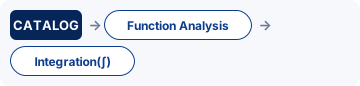
- CATALOG → Function Analysis → Integration(∫). Type the function and the limits 0 and 2, EXE.
- CATALOG → Function Analysis → Derivative(d/dx). Type the function and x = 1, EXE.
- For trig functions set radians first: SETTINGS → Calc Settings → Angle Unit → Radian.
Numerical derivative and integral on the Casio fx-CG50
Written for OS 3.80 (menus unchanged from OS 3.60 onwards as far as we can tell). Casio fx-CG50: graphic (GDC).
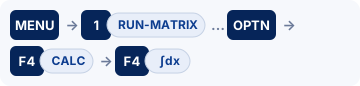
- MENU 1 (RUN-MATRIX).
- Derivative at a point: OPTN F4 (CALC) F2 (d/dx). In the template type X² e^(−X) (e^ is SHIFT ln), move to the box after x = and type 1, then EXE.
- Definite integral: OPTN F4 (CALC) F4 (∫dx). Type the function, then the lower limit 0 and upper limit 2 in the boxes, then EXE.
- Area from the graph instead: in GRAPH, draw Y1, then SHIFT F5 (G-SOLVE) F6 (▷) → ∫dx, move to the lower limit and EXE, then the upper limit and EXE: the region is shaded and its value shown.
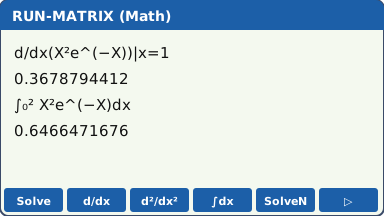
- In linear input mode the syntax is d/dx(f(X), 1) and ∫(f(X), 0, 2).
- For the distance travelled use ∫|v(t)|dt: Abs is in OPTN → NUMERIC → Abs (press F6 (▷) in the OPTN menu to reach NUMERIC).
- Area between two curves: ∫(Y1 − Y2) between the intersections, with Abs if the curves cross inside the interval. Y1 is typed with VARS F4 (GRAPH) F1 (Y) 1.
Numerical derivative and integral on the TI-84 Plus CE
Written for OS 5.8.x. TI-84 Plus CE: graphic (GDC); also the TI-84 Plus CE Python / CE-T Python Edition.

- Derivative: math 8: nDeriv( (on the CE with MathPrint it is a d/dx template). Type X² e^(−X) (e^ is 2nd ln), put X in the variable box and 1 as the value, enter.
- Integral: math 9: fnInt( (the ∫ template). Lower limit 0, upper limit 2, the function, and X after d. enter.
- From the graph: 2nd trace (CALC) 6: dy/dx at a point, or 7: ∫f(x)dx with lower and upper limits: the area is shaded.
- Using Y1 in the template (alpha trace (F4 shortcut) → Y1) saves retyping the function.
- abs( is math → NUM → 1: abs(.
Numerical derivative and integral on the TI-Nspire CX II
Written for OS 6.x. TI-Nspire CX II: graphic (GDC), non-CAS (the CX II CAS is a different model: check the exam rules before using one).

- Calculator page: menu → Calculus → Numerical Derivative at a Point. Choose the variable x and the value 1, OK, then type x²·e^(−x) in the template and enter.
- Integral: menu → Calculus → Numerical Integral, then fill in 0, 2 and x²·e^(−x) and enter. (The templates key templates also has the ∫ and d/dx templates.)
- From the graph: menu → Analyze Graph → Integral (click the lower and upper bounds) or → dy/dx.
- Defining f1(x) on a Graphs page lets you type f1(x) in the Calculator page instead of the whole function.
For teachers: Show on the board Print a keystroke card Teaching GDC skills
Worked example
f(x) = x²e−x. Find (a) f′(1), (b) ∫₀² f(x) dx. (c) Why does ∫₀^π sin x dx give 0.0861 on some calculators?
Answers (checked with Python)
(a) f′(1) = 0.367879 (exactly e−1). (b) 0.646647 (exactly 2 − 10e−2). (c) The calculator is in degrees: the answer in radians is 2; in degree mode it integrates sin of x degrees and gives 0.0861.
Now try it on an exam-style question
Use the keystrokes above on IGCSE-style differentiation questions. Free to try, no sign-up.
Common calculator mistakes
- Degree mode: any trig integral or derivative is wrong unless the calculator is in radians. ∫₀^π sin x dx should be 2, not 0.0861.
- Area vs integral: if the curve goes below the x-axis, the integral subtracts that part. For an area use |f(x)| (Abs) or split the interval at the root.
- Wrong variable: on the fx-CG50 and TI-84 the variable in the function must be X; on the TI-Nspire it must match the variable in d/dx or dx.
- Rounding the limits: if a limit is an intersection you found earlier, use the stored full value, not 3 s.f.
- "Use calculus" or "show that" questions need the working: a calculator value alone scores little.
If you get an error
fx-991EX: Math ERROR, Syntax ERROR, Time Out
Math ERROR A result, or a value you typed, is outside the range the calculator can handle, or you asked for something mathematically impossible, such as dividing by zero. Check: A function that is undefined somewhere between the limits, such as ln x or 1/x at x = 0, or a limit typed into the wrong box. Fix: Casio's advice: check the values you typed, use fewer digits and try again. If a variable is the input to a function, make sure its value is one the function accepts.
Syntax ERROR There is a problem with the format of the calculation. In Matrix and Vector calculations it also appears when the sizes do not suit the operation. Check: A missing or extra bracket, or two operation signs in a row. With matrices or vectors: adding a 2 × 2 to a 3 × 3, or a product whose sizes do not match. Fix: Casio's advice: make the corrections. For matrices and vectors, check the size you set for each one.
Time Out A derivative or integral calculation ended without meeting its ending condition. Check: An integral of a function that changes very quickly, or over a very wide interval. Fix: Casio's advice: increase the tol (tolerance) value. The answer is then less precise.
fx-991CW: Math ERROR, Syntax ERROR
Math ERROR A result, or a value you typed, is outside the range the calculator can handle, or you asked for something mathematically impossible, such as dividing by zero. Check: A function that is undefined somewhere between the limits, such as ln x or 1/x at x = 0, or a limit typed into the wrong box. Fix: Casio's advice: check the values you typed, use fewer digits and try again. If a variable is the input to a function, make sure its value is one the function accepts.
Syntax ERROR There is a problem with the format of the calculation: it is typed in a form the calculator cannot read. Check: A missing or extra bracket, two operation signs in a row, or a function with nothing after it. Fix: Casio's advice: make the corrections and try again.
fx-CG50: Ma ERROR
Ma ERROR Casio's Math ERROR: the result is outside the allowable calculation range, or you are trying to do an illegal mathematical operation, such as dividing by zero. Check: A function that is undefined somewhere between the limits, such as ln x or 1/x at x = 0, or a limit typed into the wrong box. Fix: Casio's advice: check your input values and change them so the result is within the allowable range.
TI-84 Plus CE: ERR:DOMAIN, ERR:SYNTAX
ERR:DOMAIN A value given to a function or instruction is outside the values it accepts. In a regression, TI says it means the data do not suit the model you chose. Check: A function that is undefined somewhere between the limits, such as ln x or 1/x at x = 0, or a limit typed into the wrong box. Fix: Change the value that is out of range, or choose a model that suits the data.
ERR:SYNTAX The command contains a syntax error: a misplaced function, argument, bracket or comma. Check: TI points out that subtract − and negative (−) are different keys, and using the wrong one causes this error. Then check the brackets and commas. Fix: Find the misplaced function, argument, bracket or comma and correct it.
TI-Nspire CX II: Domain error, Syntax error
Domain error An argument must be in a specified domain, and this one is not (TI's example: rand(0)). Check: A function that is undefined somewhere between the limits, such as ln x or 1/x at x = 0, or a limit typed into the wrong box. Fix: Change the value that is out of range.
Syntax error The syntax checker found a problem. Check: A missing bracket or comma. Fix: Correct the expression and try again.
Do it in Desmos
Not in the exam. Desmos is not allowed in IGCSE exams. Use it to learn, to check an answer and to see the graph behind a question.
- Define f(x) = x^2 e^(−x).
- Type f′(1) (use the apostrophe for the dash): Desmos evaluates the derivative at 1.
- Type the integral with the int template: ∫ from 0 to 2 of f(x) dx. To shade the area, add the inequality 0 ≤ y ≤ f(x) {0 ≤ x ≤ 2}.
Open desmos.com/calculator (free, in any browser) and type:
f(x)=x^{2}e^{-x}f'(1)int_{0}^{2}f(x)dx0≤ y≤ f(x){0≤ x≤2}
Questions
Can I use a calculator for numerical derivative and integral in the exam?
On Pearson Edexcel International GCSE Maths A (4MA1), yes: Paper 1H and Paper 2H both allow a calculator with no CAS. On Cambridge IGCSE 0580 (from 2025), Papers 1 and 2 are non-calculator, and the syllabus says you should have a scientific calculator for Papers 3 and 4.
What are the fx-991EX keystrokes for numerical derivative and integral?
MENU 1 (Calculate). Then Integral: press ∫▭ (the integral key), type X² e^(−X) (e^ is SHIFT ln), then the limits 0 and 2 with the arrow keys, =. Then Derivative: SHIFT ∫▭ (d/dx). Type the function, move to x = and type 1, =. The full steps and the other calculators are in the keystrokes section above.
Does this work on other calculators?
Yes. This page has keystrokes for the Casio fx-991EX ClassWiz, Casio fx-991CW ClassWiz, Casio fx-CG50, TI-84 Plus CE and TI-Nspire CX II. The worked example has the same answers on every model, so use it to check.
What should I write as working?
Write the maths, not the key presses: say what you are finding in normal notation (the equation, the probability statement or the integral), then the calculator's answer to the accuracy the question asks for (often 3 significant figures). Keep full accuracy in later parts.
More calculator skills
Sources
- Casio fx-991EX / fx-570EX Quick Start Guides : Casio fx-991EX ClassWiz, the fixed ROM (these models take no OS updates).
- Casio fx-991CW / fx-570CW User's Guide : Casio fx-991CW ClassWiz, the fixed ROM (these models take no OS updates).
- Casio fx-CG50 Software User's Guide, OS 3.70 (PDF) : Casio fx-CG50, OS 3.80 (menus unchanged from OS 3.60 onwards as far as we can tell).
- TI-84 Plus CE guidebook (Texas Instruments) : TI-84 Plus CE, OS 5.8.x.
- TI-Nspire CX II guidebooks (Texas Instruments) : TI-Nspire CX II, OS 6.x.
- Desmos Help Center for the Desmos functions.
Menu names are taken from each manufacturer's manual for the models shown. Menus can move slightly between OS updates: if a screen looks different on yours, the manual for your version is the reference, and please tell us so we can update this page. A calculator with no tab here has no checked steps for this skill yet. Worked-example answers were recomputed independently in Python.